Category: Uncategorized

  • SENSYNE Ring Light with Stand: A Practical Guide to Lighting, Phone Mounting, and Content Creation

    SENSYNE Ring Light with Stand: A Practical Guide to Lighting, Phone Mounting, and Content Creation

    Good lighting can make a noticeable difference in photos and videos. Even a capable smartphone camera may produce inconsistent results when the surrounding environment is dark, shadows fall across the face, or the main light source comes from an awkward direction. For people who create social media content, attend video calls, record tutorials, or simply want better-looking personal photos, controlling the lighting can be more useful than constantly changing camera equipment.

    A ring light with a phone stand combines two practical functions into one setup: illumination and smartphone positioning. Instead of holding a phone while trying to manage a separate lamp, the user can place the phone in a fixed position and adjust the light around it.

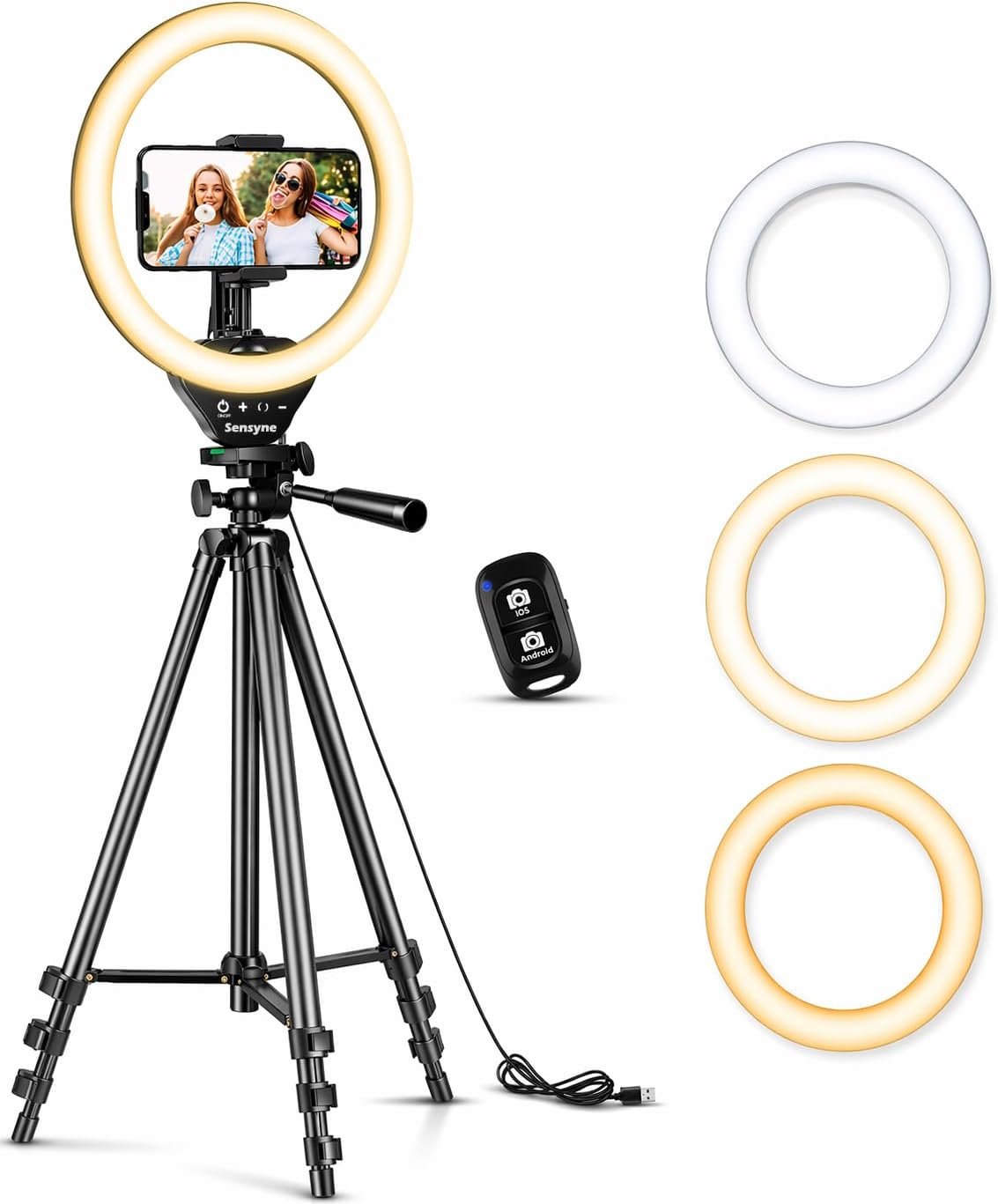
    The SENSYNE Ring Light with Stand is designed around this type of setup. The product combines a ring light, a stand reaching up to approximately 50 inches, a phone holder, and a wireless remote intended to provide additional control when taking photos or recording video.

    This type of equipment can be useful for a wide range of activities, including social media content, video calls, selfies, livestreaming, product demonstrations, online teaching, makeup application, and casual photography. Its usefulness, however, depends on how the setup is positioned and how the user intends to use it.

    This guide explains the main features of a ring light and tripod system, how the SENSYNE setup can be incorporated into different workflows, what users should consider before using one, and how a phone-based lighting stand compares with other common lighting solutions.

    What Is a Ring Light With a Phone Stand?

    A ring light is a circular light source designed to illuminate a subject from around the camera or phone.

    The circular arrangement can help create relatively even front lighting because the light comes from multiple directions around the center opening.

    When a smartphone is positioned in the center of the ring, the light can illuminate the person or subject while the phone records or captures the image.

    A phone tripod adds another important function: stability.

    Instead of holding the phone in one hand, the user can place it in a holder attached to the stand. This leaves both hands available for other activities.

    The combination is particularly practical for content creation because the same setup can support lighting, framing, and hands-free recording.

    Key Features of the SENSYNE Ring Light With Stand

    Ring Light Illumination

    The primary purpose of the setup is to provide a dedicated light source for photos and video.

    Room lighting is not always positioned in an ideal location. Overhead lights can create shadows under the eyes, while a window may produce strong contrast depending on the time of day.

    A ring light can provide a more controlled source positioned directly in front of the subject.

    This makes it easier to create consistent lighting across different recording sessions.

    Adjustable Stand Up to 50 Inches

    The included stand is designed to extend to approximately 50 inches.

    A height-adjustable stand provides more flexibility than placing a phone on a desk or holding it manually.

    The appropriate height depends on the activity.

    For a seated video call, the phone may need to be around face level. For standing content, the stand can be raised higher. For certain tabletop demonstrations, a lower position may be more appropriate.

    Being able to change the height also makes the setup easier to adapt to different rooms.

    Smartphone Holder

    The phone holder keeps a compatible smartphone positioned in front of the ring light.

    This is particularly useful for people who record themselves because the camera can remain fixed while the user moves naturally within the frame.

    A stable phone position can also make repeated recordings easier because the framing can remain relatively consistent between takes.

    Wireless Remote

    The included wireless remote provides a way to trigger the smartphone camera without physically touching the phone.

    This can be useful when the phone is several feet away on the stand.

    For example, someone recording a full-body video would otherwise need to walk back to the phone every time they wanted to start or stop the camera.

    A remote can reduce that inconvenience.

    Wireless remote functionality can also be helpful for selfies and group photographs.

    Users should verify that their specific smartphone and camera application support the remote’s functionality, since Bluetooth camera-control behavior can vary between devices and operating systems.

    Compact Content-Creation Setup

    One of the main advantages of combining the light, stand, phone holder, and remote is that these components can work together as a single basic content-creation station.

    Rather than assembling a separate lamp, tripod, phone mount, and remote, the user can work with one integrated setup.

    This can be useful for people who are beginning to create content and want a straightforward arrangement without immediately investing in more specialized studio equipment.

    Why Lighting Matters for Smartphone Photography

    Modern smartphones can perform well in many lighting conditions, but the camera still depends on the physical environment.

    Photography is fundamentally influenced by light.

    When a subject is poorly illuminated, the camera may need to increase exposure or use computational processing to produce a usable image. Depending on the circumstances, this can result in more visible noise, softer details, stronger shadows, or uneven skin tones.

    Adding a controlled light source can make the camera’s job easier.

    The goal is not necessarily to make the image extremely bright. Instead, good lighting aims to place enough light on the subject while maintaining a natural appearance.

    A ring light can be particularly useful for front-facing portraits because its position around the camera helps direct light toward the face.

    How the SENSYNE Ring Light Can Be Used

    Social Media Videos

    Social media creators often record content from a fixed location.

    A ring light and phone stand can make this process more consistent.

    The user can position the stand at an appropriate height, place the phone in the holder, adjust the lighting, and record without needing another person to operate the camera.

    This can be useful for short-form videos, educational clips, demonstrations, talking-head content, and other formats where the creator remains in front of the camera.

    Selfies

    A phone stand can also make taking selfies easier.

    Instead of holding the smartphone at arm’s length, the user can place it on the stand and use the wireless remote to trigger the camera.

    This allows more flexibility with framing and positioning.

    It can also be useful for full-body photographs or group pictures where the phone needs to be placed farther away.

    Video Calls

    Video conferencing is another practical application.

    A laptop webcam or smartphone camera may be positioned in a location where the lighting is not ideal.

    A dedicated light can improve the illumination on the user’s face, particularly when the room is dim.

    The stand can also help position a smartphone at a more natural eye level.

    Good video-call lighting does not need to be complicated. A consistent light source placed in front of the user can often be more useful than relying entirely on ceiling lights.

    Online Teaching

    Teachers, tutors, coaches, and instructors who create educational videos can use a phone-based lighting setup for recording.

    The phone can be positioned at a fixed height while the user explains a topic.

    For demonstrations, the setup can be repositioned depending on whether the camera needs to show the instructor, a physical object, or a work surface.

    The stand’s adjustability can therefore be useful when changing between different types of educational content.

    Makeup and Beauty Content

    Makeup application and beauty-related content often benefits from relatively even front illumination.

    Shadows can make it more difficult to see details around the face.

    A ring light positioned at an appropriate height can provide consistent illumination while the smartphone records.

    The user can also use the setup as a personal light while applying makeup without necessarily recording.

    Product Demonstrations

    Small businesses and content creators can use a phone tripod and ring light to demonstrate products.

    For example, someone could place a product on a table and position the smartphone so that the object remains centered in the frame.

    The light can then be adjusted to reduce unwanted shadows.

    For reflective products, however, ring lights can sometimes create visible circular reflections. In those cases, changing the angle or moving the light farther away may help.

    Livestreaming

    A stable phone position is important for livestreaming.

    A tripod reduces the need to hold the phone continuously and allows the creator to remain within a consistent frame.

    The ring light can provide dedicated illumination while the wireless remote can be useful for certain camera-control situations.

    The exact workflow depends on the livestreaming platform and smartphone being used.

    Remote Meetings and Presentations

    A phone-based stand can also be useful for informal professional presentations or remote meetings.

    The goal is to position the camera at a comfortable height and provide enough front lighting to keep the subject clearly visible.

    For people who frequently participate in video meetings, a consistent setup can save time because the same lighting and camera position can be recreated from one session to another.

    Who the SENSYNE Ring Light May Be Suitable For

    Social Media Creators

    People creating regular smartphone-based content may benefit from having a dedicated lighting setup that can remain ready for use.

    The combination of a light, phone holder, stand, and remote covers several basic requirements for self-recording.

    Beginners in Content Creation

    Someone starting with video content does not necessarily need a complete professional studio.

    A simple smartphone-based setup can provide a practical starting point for learning framing, lighting, camera positioning, and presentation.

    As content requirements become more demanding, users can add microphones, additional lights, backdrops, or other equipment later.

    Students

    Students can use a phone stand and ring light for presentations, video assignments, online classes, or recording study content.

    The hands-free configuration can make it easier to demonstrate physical objects or write on a board while remaining on camera.

    Remote Workers

    People working from home may use a ring light to improve their appearance on video calls.

    This can be especially useful in rooms where natural light changes throughout the day.

    Small Business Owners

    Small businesses can use smartphones to create product photos, demonstrations, social media videos, and promotional educational content.

    A consistent lighting setup can make repeated content production easier.

    Makeup Artists and Beauty Creators

    The front-facing lighting provided by a ring light can be useful when demonstrating makeup techniques or recording beauty-related tutorials.

    Casual Photographers

    Even users who do not create professional content can benefit from a hands-free phone camera setup for family photos, group pictures, celebrations, and other occasions.

    Important Things to Consider

    Lighting Position Matters

    Simply turning on a ring light does not guarantee ideal lighting.

    Position is important.

    For a typical talking-head video, the light can be placed approximately in front of the subject, with the phone positioned within or near the center of the ring.

    The height can then be adjusted so that the light is not coming from too far above or below eye level.

    Small changes in distance and angle can produce noticeable differences in shadows and reflections.

    Distance Affects the Look

    A light placed very close to the subject can create stronger illumination, while moving it farther away can produce a different balance.

    Users should experiment with distance rather than always keeping the stand at the same position.

    A more distant light may provide a wider area of illumination, while a closer light can provide more concentrated brightness.

    Room Lighting Still Matters

    A ring light does not exist in isolation.

    Natural daylight, overhead lights, lamps, windows, and other sources all influence the final image.

    Mixing several light sources with different color characteristics can sometimes produce inconsistent results.

    For a simple setup, users may find it easier to control the surrounding lighting as much as possible.

    Smartphone Compatibility

    The phone holder should be checked for compatibility with the user’s device.

    Smartphones vary considerably in dimensions and case thickness.

    A large protective case may affect how securely a phone fits into a holder.

    It is therefore worth checking the holder’s supported size range before setting up the equipment.

    Wireless Remote Compatibility

    The wireless remote is intended to provide convenient camera control, but compatibility can vary.

    Different smartphone operating systems and camera applications can interpret Bluetooth shutter commands differently.

    Users should verify that the remote works with their specific phone and preferred camera application.

    Stability

    A tall tripod becomes more sensitive to movement, particularly if the phone is positioned high above the ground.

    The stand should be placed on a stable, level surface.

    Users should avoid positioning it where people can easily bump into it.

    A stable setup is especially important when using a phone in a heavier case or when the stand is extended to a greater height.

    Background and Framing

    Lighting is only one part of a good video.

    The background, camera angle, subject position, and composition also matter.

    Before recording, users should check the entire frame rather than focusing only on their face.

    A simple background can help keep attention on the subject, while cluttered surroundings may distract from the content.

    Reflections

    Ring lights can create visible circular reflections on glasses, glossy surfaces, mirrors, screens, and other reflective objects.

    If reflections become distracting, users can experiment with changing the angle or distance of the light.

    People who wear glasses may also need to adjust the light slightly to reduce reflections in the lenses.

    Not a Complete Studio

    A ring light and phone tripod can provide useful basic equipment, but it does not replace every component of a professional studio.

    Professional production may require multiple lights, softboxes, dedicated cameras, audio equipment, backgrounds, stands, and other accessories.

    The SENSYNE-style setup is more appropriate to the concept of simple, accessible smartphone-based content creation.

    Ring Light vs. Desk Lamp

    A conventional desk lamp can provide illumination, but its design is usually intended for a work surface rather than photography.

    A desk lamp may create stronger shadows because the light comes from one relatively small source.

    A ring light surrounds the camera area and is specifically suited to front-facing illumination.

    However, a desk lamp can be more versatile for general room lighting and may be useful for tasks that do not involve photography or video.

    The choice depends on whether the primary goal is subject illumination or everyday lighting.

    Ring Light vs. Natural Window Light

    Natural window light can be excellent for photography and video, especially when it is soft and comes from an appropriate direction.

    It is also free and requires no additional equipment.

    The limitation is consistency.

    Sunlight changes throughout the day, weather affects brightness, and the direction of the sun changes over time.

    A ring light provides a more predictable artificial source that can be used at night or in rooms without suitable windows.

    Many creators combine natural light with artificial lighting rather than treating them as mutually exclusive options.

    Ring Light vs. Softbox Lighting

    Softboxes are common in more advanced photography and video setups.

    Their larger diffusion surfaces can create soft, flattering illumination and provide greater control over the direction and quality of light.

    A ring light is generally simpler and more compact.

    For smartphone content, video calls, selfies, and basic talking-head videos, a ring light can provide a straightforward solution.

    For professional studio work, users may eventually prefer a more flexible multi-light system.

    Tripod Phone Stand vs. Handheld Recording

    Handheld recording offers flexibility and spontaneity.

    It can be useful when moving around or creating informal content.

    The disadvantage is that the phone can shake, the framing can change, and one hand remains occupied.

    A tripod stand provides stability and repeatability.

    It is particularly useful when the user needs both hands available or wants to record from a fixed position.

    The two approaches serve different purposes and can easily coexist.

    Creating a Simple Smartphone Recording Station

    A basic recording station does not need to be complicated.

    Start by choosing a stable location with enough space for the tripod.

    Position the phone at approximately eye level for talking-head content.

    Place the ring light around the camera and adjust the height.

    Then check the camera preview.

    Look for shadows, reflections, distracting objects, and unwanted bright areas in the background.

    If the face appears too bright, the light may be too close or intense. If the image looks dark, moving the light closer or reducing competing background shadows may help.

    Once the position works, mark or remember the setup so it can be recreated later.

    Consistency can be particularly useful for creators who produce content regularly.

    Tips for Better Smartphone Content

    Keep the Camera Near Eye Level

    For many talking-head videos, positioning the camera around eye level creates a natural perspective.

    A camera that is too low or too high can change the appearance of the face and body.

    Check the Entire Frame

    Do not focus only on the subject.

    Look at the background, visible furniture, cables, windows, and other objects.

    A clean frame can make even simple content feel more organized.

    Avoid Overexposure

    More light is not always better.

    If highlights become extremely bright and facial details disappear, reduce the light level or increase the distance between the light and subject.

    Maintain Consistent Lighting

    If multiple videos are part of the same series, try to maintain a similar lighting position.

    This creates a more consistent appearance between recordings.

    Use the Wireless Remote Strategically

    The remote can be particularly useful when the phone is positioned several feet away.

    Set up the framing first, then use the remote to trigger the camera when appropriate.

    Keep the Tripod Stable

    Avoid placing the stand on unstable surfaces.

    If the setup is being used in a high-traffic area, position it where it is less likely to be bumped.

    Frequently Asked Questions

    What is the SENSYNE Ring Light with Stand designed for?

    It is designed as a smartphone-oriented lighting and camera-positioning setup. The combination of a ring light, adjustable stand, phone holder, and wireless remote can support photography, video recording, video calls, social media content, and other hands-free smartphone applications.

    How tall is the stand?

    The product is described as having a stand that extends to approximately 50 inches. Actual working height depends on how the stand is adjusted and how the phone is positioned.

    Can it be used for video calls?

    Yes, a ring light and phone stand can be useful for video calls by providing controlled front lighting and keeping the phone at a stable position.

    Is the wireless remote useful for selfies?

    It can be useful for compatible smartphones because it allows the user to trigger the camera without physically holding the phone. Compatibility with the specific phone and camera application should be confirmed.

    Can the setup be used for TikTok or other social media videos?

    A phone tripod and ring light can be used for many forms of social media video, including vertical content. The user simply needs to position the phone appropriately for the desired orientation and framing.

    Can it be used for full-body photos?

    The adjustable stand and remote can make full-body photography more practical because the phone can be positioned farther away while the user remains hands-free.

    Is a ring light better than natural light?

    Not necessarily. Natural light can produce excellent results, but it changes throughout the day. A ring light provides a more controlled and repeatable artificial source. The best choice depends on the environment and intended use.

    Does a ring light eliminate shadows?

    A ring light can reduce certain facial shadows by providing relatively even front illumination, but it cannot eliminate every shadow. Room lighting, subject position, distance, and surrounding objects all affect the final result.

    Can people who wear glasses use a ring light?

    Yes, but reflections can occur on eyeglasses. Adjusting the angle, height, or distance of the light can sometimes reduce unwanted reflections.

    Can a phone case affect the phone holder?

    It can. Thick or unusually large cases may affect how securely a phone fits into a holder. Users should verify the holder’s supported phone dimensions.

    Is a ring light enough for professional video production?

    It can be useful for basic content creation, but professional productions may require additional lighting, audio equipment, cameras, backgrounds, and other tools.

    Can the ring light be used without recording video?

    Yes. A dedicated light can also be useful for selfies, makeup application, video calls, online meetings, product work, or general close-range illumination.

    Where should a ring light be placed for a video?

    For many talking-head situations, placing the light in front of the subject and keeping the camera near the center of the light provides a useful starting point. Height and distance can then be adjusted according to the desired appearance.

    Why does lighting change the appearance of smartphone photos?

    Lighting determines how shadows, highlights, colors, and facial details appear. A controlled light source can make the subject more evenly illuminated and can help the smartphone camera capture the scene more consistently.

    Conclusion

    The SENSYNE Ring Light with Stand combines several simple tools that are useful for smartphone-based photography and video: a ring light for controlled front illumination, an adjustable stand for positioning, a phone holder for hands-free recording, and a wireless remote for compatible camera control.

    The combination can support many everyday applications, from social media videos and selfies to video calls, online teaching, product demonstrations, livestreaming, and remote work.

    The biggest advantage of a setup like this is not any single component by itself. It is the way the components work together. A stable phone position makes framing easier, dedicated lighting can improve consistency, and a wireless remote can make hands-free recording more convenient.

    At the same time, good results depend on how the equipment is used. Lighting position, distance, room conditions, phone compatibility, tripod stability, background composition, and reflections all matter. A ring light is a useful tool, but it does not automatically produce professional-looking content without attention to the rest of the setup.

    For beginners, a simple phone-based lighting station can provide a practical way to learn the fundamentals of lighting, framing, and recording without requiring a complicated studio. More experienced creators can also use a compact ring-light setup as a secondary station or a convenient solution for quick recordings.

    Whether the goal is improving video calls, creating social media content, taking hands-free photos, or building a basic home recording space, understanding how the light, stand, phone, and remote work together can help users get more value from this type of equipment.
    You can check more details on Amazon here.

  • RayNeo Air 3s Pro AR/XR Glasses: Understanding the 201-Inch Virtual Display, 120Hz Refresh Rate, and HueView 2.0

    RayNeo Air 3s Pro AR/XR Glasses: Understanding the 201-Inch Virtual Display, 120Hz Refresh Rate, and HueView 2.0

    The way people consume digital content is changing as displays become smaller, lighter, and increasingly portable. Smartphones, tablets, laptops, televisions, and gaming monitors each have their own advantages, but they all require users to look at a physical screen. AR and XR glasses approach the problem differently by placing display technology directly in front of the user’s eyes while maintaining a glasses-like form factor.

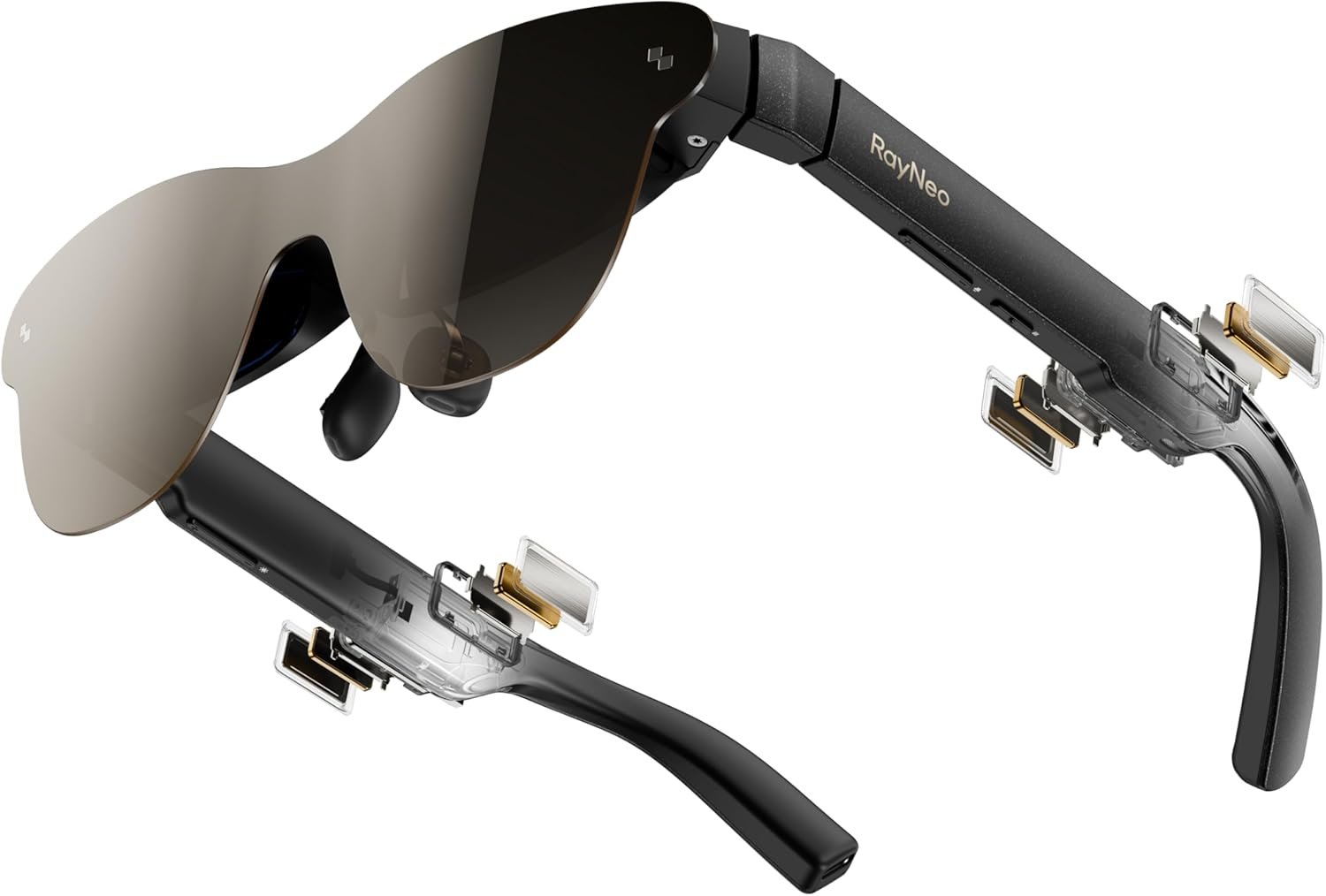
    The RayNeo Air 3s Pro AR/XR Glasses are designed around this concept. The product combines a wearable display with technologies intended to create a large virtual viewing experience without requiring a physically large television or monitor. The listed specifications include a 201-inch virtual display, up to 120Hz refresh rate, 1200 nits brightness, and HueView 2.0 display technology.

    These specifications are particularly relevant for people interested in portable entertainment, gaming, productivity, travel, and personal viewing. Instead of carrying a large monitor, a user can potentially connect compatible devices to a pair of display glasses and view content through the wearable display.

    Understanding products in this category requires looking beyond individual numbers. A large virtual screen does not mean the glasses physically contain a 201-inch panel, for example. Similarly, brightness, refresh rate, resolution, color performance, compatibility, comfort, and connection methods all contribute to the overall experience.

    This guide explains how the RayNeo Air 3s Pro fits into the AR/XR glasses category, what its listed display features mean, how this type of wearable screen can be used, and what prospective users should consider before incorporating it into their technology setup.

    What Are AR and XR Display Glasses?

    AR and XR glasses are wearable computing or display devices designed to place digital content within the user’s field of view.

    Although the terminology can vary between manufacturers, the general concept is different from simply wearing a conventional pair of glasses.

    A display system inside the glasses presents visual content to the wearer. Depending on the product and its capabilities, the glasses may function primarily as a private virtual display for connected devices rather than as a fully independent augmented-reality computer.

    This distinction is important.

    Some people hear “AR glasses” and imagine digital objects being freely projected throughout a physical room. Other products in the category are primarily designed to provide a large virtual screen for movies, games, applications, or desktop content.

    The RayNeo Air 3s Pro is particularly relevant to the second type of use case: using wearable display hardware to create a large personal viewing environment.

    The concept can be especially interesting when physical screen size is limited.

    A laptop may have a relatively compact display. A handheld gaming device has an even smaller screen. A smartphone is smaller still. Display glasses can provide a different viewing format by presenting content through optics positioned close to the user’s eyes.

    Understanding the 201-Inch Virtual Display

    One of the most prominent specifications associated with the RayNeo Air 3s Pro is its advertised 201-inch virtual display.

    It is important to understand what this number means.

    The glasses do not contain a physical 201-inch screen. Instead, the display system creates the visual impression of a much larger screen positioned at a virtual distance.

    This is similar to the idea of sitting in front of a large cinema screen without physically having a cinema-sized panel in the room.

    The benefit of a large virtual display is primarily the sense of scale.

    A movie viewed on a smartphone may require the user to concentrate on a relatively small physical screen. A wearable display can make the same type of content appear much larger within the user’s visual field.

    For gaming, a larger perceived screen can also change how the interface feels. Elements that appear compressed on a handheld display may become easier to view when presented through a larger virtual canvas.

    The virtual screen concept is therefore one of the main reasons wearable displays can complement existing devices.

    120Hz Refresh Rate Explained

    Another notable specification is the 120Hz refresh rate.

    Refresh rate describes how frequently a display can update the image each second. A 120Hz display can refresh up to 120 times per second under appropriate conditions.

    Higher refresh rates can contribute to smoother perceived motion, particularly when the source device and content can provide the necessary frame rate.

    This can be relevant for:

    • Gaming
    • Fast-moving video
    • Scrolling interfaces
    • Interactive applications
    • General visual responsiveness

    However, a 120Hz capability does not automatically mean every piece of content will run at 120Hz.

    The source device, application, connection, video format, and other technical factors can affect the actual experience.

    For example, a movie created at a lower frame rate does not become native 120Hz content simply because the display is capable of refreshing at 120Hz.

    The practical advantage of a higher refresh-rate display is therefore most noticeable in situations where the content and connected hardware can make use of it.

    Understanding the 1200-Nit Brightness Specification

    Brightness is another important consideration for wearable displays.

    The RayNeo Air 3s Pro is listed with a brightness specification of up to 1200 nits.

    A nit is a unit used to describe luminance. In simple terms, a higher brightness capability can help a display remain visible in brighter environments.

    This is particularly relevant to wearable displays because users may not always be sitting in a completely dark room.

    However, brightness specifications should be interpreted carefully.

    Maximum brightness is not necessarily the brightness used continuously in every situation. Actual perceived visibility can also depend on ambient lighting, optical design, lens characteristics, contrast, content, and other factors.

    Higher brightness can be useful for improving visibility, but it is not the only factor that determines display quality.

    For comfortable long-duration viewing, users may also want to consider room lighting and personal viewing preferences.

    HueView 2.0 Display Technology

    HueView 2.0 is another technology associated with the RayNeo Air 3s Pro display system.

    Display technology is more complicated than a single brightness or refresh-rate number. Color reproduction, contrast, visual consistency, image processing, and optical characteristics all contribute to what the user ultimately sees.

    A display technology such as HueView 2.0 can therefore be considered part of the broader visual system rather than an isolated feature.

    For users interested in movies, games, digital content, and other visually detailed applications, color presentation can influence how immersive the virtual screen feels.

    At the same time, specifications alone cannot fully describe how every type of content will appear. Different applications can use different color profiles, brightness levels, and image characteristics.

    Key Features of the RayNeo Air 3s Pro

    Large Virtual Viewing Experience

    The 201-inch virtual display specification is intended to create the perception of a large personal screen.

    This can be useful for users who want a cinema-like viewing scale without carrying a large physical display.

    The concept can be especially practical when traveling, staying in temporary accommodation, or using compact workspaces.

    120Hz Display Capability

    A refresh rate of up to 120Hz can support smoother motion when compatible content and source hardware provide suitable frame rates.

    This makes the glasses potentially relevant to gaming and other interactive applications where motion responsiveness matters.

    Up to 1200 Nits Brightness

    The listed brightness capability can help support visibility in different viewing environments.

    Users should nevertheless consider ambient lighting and the other elements of display performance rather than evaluating the glasses based on brightness alone.

    Wearable Form Factor

    One of the central advantages of display glasses is their physical format.

    Instead of carrying a separate monitor, the user wears the display.

    This can make the concept attractive to people who travel frequently or work with devices that have relatively small screens.

    Personal Viewing

    A wearable display can provide a more private viewing experience than a conventional television or monitor.

    The user can potentially view compatible content without requiring a large screen to occupy a shared room.

    This can be useful in situations where other people are nearby or where physical space is limited.

    Compatibility With External Devices

    AR/XR display glasses generally depend on compatible external hardware for many use cases.

    Depending on the connection and device involved, users may connect display glasses with computers, gaming hardware, smartphones, handheld systems, or other compatible sources.

    Compatibility should always be checked for the specific device rather than assumed simply because both products use USB-C or another common connector.

    How the RayNeo Air 3s Pro Can Be Used

    The flexibility of a wearable display comes from the fact that the glasses can serve as a screen for different types of content.

    Watching Movies and Video

    Personal entertainment is one of the most straightforward applications.

    A large virtual display can make movies, television programs, streaming content, and other video feel more like a large-screen viewing experience.

    This can be particularly useful during travel.

    Instead of carrying a portable monitor, users can potentially use the glasses with compatible equipment to create a personal viewing environment.

    The experience can also be useful at home when a user wants a large virtual screen without installing a television.

    Gaming

    Gaming is another major application for display glasses.

    A handheld gaming device normally places the game on a relatively small physical display. A compatible wearable display can potentially present the game’s image on a much larger virtual screen.

    The 120Hz capability is particularly relevant to gaming because higher refresh rates can support smoother motion when the game and source hardware support appropriate frame rates.

    Different gaming devices have different connection requirements, so users should verify compatibility before planning a particular setup.

    Portable Gaming

    Portable gaming is especially interesting because physical screen size is often limited by the need to keep a device compact.

    A handheld console can remain small enough to carry while the wearable display provides a much larger viewing experience.

    This can be useful for travel, hotel rooms, or other situations where carrying a full-size monitor would be inconvenient.

    Laptop Productivity

    A wearable display can also function as an alternative viewing screen for compatible computers.

    For example, someone working from a laptop in a limited space may appreciate having a large virtual display without carrying a separate monitor.

    Depending on the user’s setup, this could be useful for reading documents, browsing the web, viewing dashboards, coding, or working with other applications.

    However, productivity requirements can be more demanding than simple entertainment.

    Users who spend many hours reading small text should pay close attention to visual clarity, comfort, fit, and the overall viewing experience.

    Travel

    Travel is one of the situations where wearable displays can make practical sense.

    A physical monitor adds weight and occupies luggage space. Display glasses can provide an alternative for users who want access to a larger personal screen while traveling.

    A traveler could potentially use compatible equipment to create a personal entertainment setup in a hotel room, on a long trip, or in another temporary environment.

    Connection accessories should be considered as part of the overall travel setup.

    Working in Small Spaces

    People living or working in smaller spaces may not want a large television or monitor permanently occupying a desk or wall.

    A wearable display can provide access to a large virtual viewing area without requiring a corresponding physical screen.

    This can make the concept attractive for compact apartments, dorm rooms, temporary workspaces, or shared environments.

    Watching Content Privately

    A conventional television is inherently a shared display.

    Wearable glasses provide a more individual viewing format.

    Someone working in a shared room can potentially use a personal display without occupying the main television.

    This can be useful when household members have different schedules or entertainment preferences.

    Who the RayNeo Air 3s Pro May Be Suitable For

    Gamers

    Gamers who use compatible devices may be interested in wearable displays because they can provide a larger viewing environment while maintaining a portable setup.

    The 120Hz capability can also be relevant to games capable of taking advantage of higher refresh rates.

    Frequent Travelers

    Travelers may appreciate the ability to carry a wearable display instead of a separate portable monitor.

    The smaller physical form factor can make personal entertainment more flexible when away from home.

    Laptop Users

    People who frequently work from laptops may find the idea of a large virtual screen useful when physical desk space is limited.

    The glasses can potentially provide another way to view compatible computer content.

    Entertainment-Focused Users

    People who primarily want a personal large-screen experience for movies and video may find the wearable-display concept particularly interesting.

    The virtual display can provide a different viewing experience from a smartphone or tablet.

    Technology Enthusiasts

    AR/XR glasses are part of a rapidly developing category of personal display technology.

    Technology enthusiasts may be interested in experimenting with wearable screens, portable gaming setups, and alternative computing workflows.

    Important Things to Consider

    Device Compatibility

    Compatibility should be one of the first things to verify.

    A wearable display is only useful if it can connect correctly to the hardware a person intends to use.

    USB-C does not necessarily mean that every USB-C device supports the required video output.

    Before purchasing or planning a setup, check the requirements of the specific computer, phone, gaming device, adapter, or other source device.

    Physical Comfort

    Display glasses are worn directly on the face, so comfort matters.

    Factors can include:

    • Frame fit
    • Weight distribution
    • Nose support
    • Temple pressure
    • Cable placement
    • Lens positioning
    • Personal facial dimensions

    A specification sheet cannot determine how comfortable a particular frame will feel for every person.

    This is especially important for long movie sessions or extended work periods.

    Vision and Prescription Needs

    People who wear prescription glasses should consider how a wearable display interacts with their normal eyewear.

    Depending on the design and available accessories, prescription solutions may be possible, but users should verify compatibility rather than assume that their existing glasses can simply be worn underneath the device.

    Brightness and Viewing Environment

    Although the listed 1200-nit capability can provide substantial brightness, ambient lighting still matters.

    Users should consider where they expect to use the glasses.

    A darker indoor environment may produce a different viewing experience from a brightly illuminated room.

    Refresh Rate Depends on the Source

    The 120Hz specification describes the display’s capability, but the connected device and content must also support appropriate output.

    A low-frame-rate video will not automatically become high-frame-rate content.

    Similarly, gaming performance depends on the source hardware and game settings.

    Battery and Connected Equipment

    Depending on the intended configuration, users should consider how the glasses receive power and how the source device connects to them.

    Portable setups can require cables, adapters, power banks, or other accessories.

    A complete travel configuration should therefore be considered rather than evaluating the glasses independently from the rest of the equipment.

    Field of View and Virtual Screen Size

    A very large virtual screen does not mean the user sees every part of a 201-inch screen in exactly the same way as sitting in front of a physical television.

    The virtual display is created through optics and has a defined field of view.

    Users who are particularly interested in immersive viewing should understand the distinction between advertised virtual screen size and physical panel dimensions.

    Motion and Personal Comfort

    Some people may experience discomfort when using wearable displays for extended periods.

    Factors such as visual focus, movement, brightness, content, and individual sensitivity can affect comfort.

    New users may benefit from shorter sessions at first and adjusting the viewing environment to their preferences.

    If a user experiences persistent discomfort, taking a break and discontinuing use until the issue is understood is sensible.

    Comparing Wearable Displays With Portable Monitors

    A portable monitor and AR/XR glasses can both solve a similar problem: providing additional screen space away from a traditional desktop.

    A portable monitor has the advantage of being a conventional physical screen. Multiple people can generally view it, and it can behave much like a normal monitor.

    Wearable glasses have a different advantage.

    They can create a large personal display without requiring a large physical panel.

    This makes them particularly interesting for individual viewing and travel.

    The choice depends on whether the user values shared physical visibility or private wearable viewing.

    Comparing AR/XR Glasses With VR Headsets

    AR/XR glasses and VR headsets can overlap in terminology but provide different physical experiences.

    VR headsets typically cover more of the user’s field of view and are designed around immersive virtual environments.

    Display glasses generally resemble eyewear more closely and can focus on providing a virtual screen while remaining relatively lightweight and portable.

    For watching a movie or using a laptop screen, a glasses-style display may be more convenient for some users.

    For fully immersive virtual reality applications, a dedicated VR headset may be more appropriate.

    Neither category automatically replaces the other.

    Comparing Wearable Displays With Smartphones and Tablets

    Smartphones and tablets are highly versatile because they include their own computing hardware, batteries, touchscreens, cameras, applications, and connectivity.

    Wearable display glasses are more specialized.

    They can provide a larger apparent viewing area while depending on compatible external devices for many tasks.

    A tablet may therefore be more convenient for reading, browsing, or general standalone use, while display glasses may be more appealing when the goal is creating a large private screen from an existing device.

    Comparing 60Hz and 120Hz Displays

    Refresh rate is another area where users may encounter significant differences between devices.

    A 60Hz display refreshes up to 60 times per second, while a 120Hz display can refresh up to 120 times per second.

    Higher refresh rates can make motion appear smoother when content supports the higher rate.

    The difference can be particularly noticeable in interactive applications and games.

    However, refresh rate should not be considered independently from resolution, image quality, connection bandwidth, source hardware, and software.

    A display is a complete system rather than a single specification.

    Practical Setup Ideas

    A wearable display can become more useful when it is integrated into a deliberate setup.

    For gaming, users might create a compact configuration consisting of a compatible handheld or computer, the glasses, the necessary connection hardware, and an appropriate power source.

    For travel, the setup could be organized around minimal accessories and reliable charging.

    For productivity, users may prefer a desk arrangement that allows the glasses to act as an additional or alternative screen.

    The key is to identify the primary use case first.

    Someone buying wearable glasses mainly for gaming will have different requirements from someone who wants them primarily for watching movies or working from a laptop.

    Caring for Wearable Display Glasses

    Because the device is worn close to the eyes, keeping the optical surfaces clean is important.

    Users should follow the manufacturer’s cleaning instructions and use appropriate materials rather than applying aggressive chemicals or abrasive materials to the lenses.

    The glasses should also be stored in a way that protects them from unnecessary pressure, scratches, moisture, and impact.

    Cables and connectors deserve attention as well, particularly when the glasses are frequently transported.

    A protective case can be useful when carrying wearable electronics between locations.

    Frequently Asked Questions

    What are the RayNeo Air 3s Pro glasses designed to do?

    The RayNeo Air 3s Pro is a wearable display product designed to provide a large virtual viewing experience. It can be relevant to entertainment, gaming, portable computing, and other applications involving compatible external devices.

    Is the 201-inch display physically 201 inches?

    No. The 201-inch specification refers to the perceived or virtual display size created by the optical display system. The glasses themselves obviously do not contain a physical 201-inch panel.

    What does 120Hz mean?

    A 120Hz refresh rate means the display can refresh up to 120 times per second under supported conditions. Higher refresh rates can provide smoother motion when the source device and content support them.

    Does every game automatically run at 120Hz?

    No. The actual refresh rate and frame rate depend on the connected hardware, software, game, settings, and connection configuration.

    What does 1200 nits mean?

    Nits are a measurement of luminance. A maximum brightness specification of 1200 nits indicates the display can reach a high level of brightness under appropriate conditions. Actual brightness during use can vary depending on settings and circumstances.

    What is HueView 2.0?

    HueView 2.0 is part of the display technology associated with the RayNeo Air 3s Pro. It is intended to contribute to the visual characteristics of the wearable display system, including aspects of color and image presentation.

    Can these glasses be used for gaming?

    They can be relevant to gaming when connected to compatible gaming hardware. Portable gaming is one of the potential use cases for wearable displays because the glasses can provide a larger virtual viewing environment than the physical screen on many handheld devices.

    Can they be used with a laptop?

    A compatible laptop and connection configuration may allow the glasses to function as a personal display. Compatibility should be checked for the specific computer and port configuration.

    Are wearable display glasses the same as VR headsets?

    Not exactly. VR headsets generally focus on immersive virtual environments, while display glasses can focus more heavily on providing a large virtual screen in a glasses-style form factor.

    Are they useful for travel?

    They can be useful for travelers who want a large personal display without carrying a conventional monitor. The practicality of a travel setup depends on the source device, cables, power requirements, and other accessories.

    Can people around me see the screen?

    A wearable display is intended primarily for the person wearing it. However, users should not assume that every display is completely invisible to people nearby. Privacy characteristics can vary based on viewing angle, brightness, environment, and optical design.

    Are AR/XR glasses suitable for long work sessions?

    Suitability varies from person to person. Comfort, fit, optical characteristics, brightness, and individual sensitivity all matter. People planning extended use should pay particular attention to ergonomics and take regular breaks.

    Do I need a separate computer to use the glasses?

    The exact requirements depend on the intended use and compatible devices. Display glasses are not necessarily equivalent to standalone computers, so users should check which functions can operate with their intended source device.

    What should I check before connecting the glasses to a device?

    Check video-output compatibility, supported connection standards, power requirements, adapters, software requirements, and any device-specific limitations. A connector that physically fits does not always guarantee video compatibility.

    Conclusion

    The RayNeo Air 3s Pro AR/XR Glasses illustrate how wearable displays can provide an alternative to conventional screens. Instead of carrying a large monitor, users can wear a compact display system capable of creating a much larger perceived viewing environment.

    The advertised 201-inch virtual display is particularly relevant to the concept, offering a cinema-style scale from a wearable form factor. The listed 120Hz refresh rate can be valuable for compatible gaming and other motion-sensitive applications, while the up-to-1200-nit brightness specification addresses another important part of display performance. HueView 2.0 adds to the overall display technology behind the visual experience.

    However, specifications should always be considered as part of a larger system.

    Compatibility with source devices, comfort, viewing conditions, connectivity, power requirements, field of view, content frame rate, and individual preferences can all influence how useful wearable display glasses become in practice.

    For gamers, travelers, laptop users, entertainment enthusiasts, and technology users interested in personal displays, the category offers an interesting alternative to traditional monitors and televisions.

    The most useful approach is to start with the intended application. Someone looking for a portable movie screen may have different priorities from someone interested in high-refresh-rate gaming or laptop productivity. Once the primary use case is clear, display specifications and compatibility requirements become much easier to evaluate.

    Wearable displays are not necessarily designed to replace every conventional screen. Instead, they provide another way to access digital content, particularly when portability, personal viewing, and large virtual screen size are important.

    You can check more details on Amazon here.